Batomon Showdown Controls
Where every shop button lives, and how to inspect a unit before you buy it.
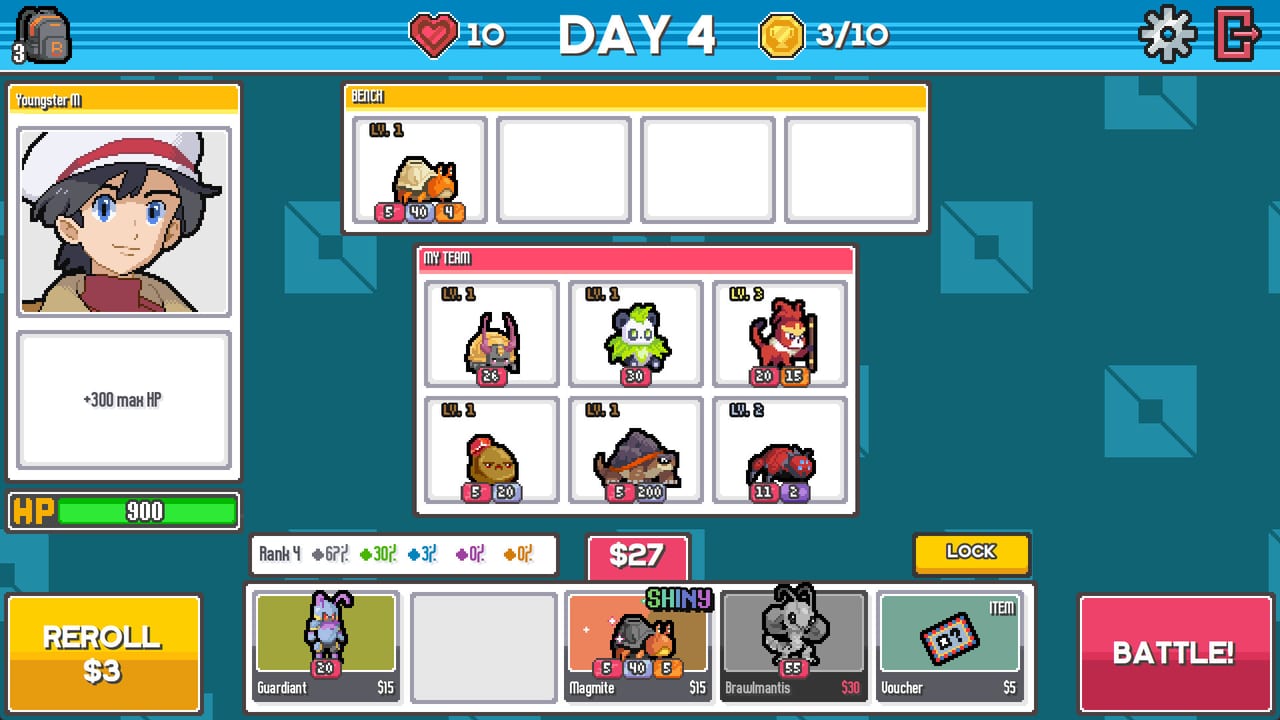
Batomon Showdown is built to be played without a countdown. That is a gift and a trap. The gift is that you can hover every ability. The trap is that new players still mash Battle because they cannot find the inspect hint, the lock, or Fast Forward. This page is the input map for the Steam Windows client, including full controller support listed on the store page. It is not a hidden-combo list. There are no fighting-game motions. If you came from a creature RPG looking for a move menu, stop: combat is automatic. Your skill is in the shop.
Use this with Getting Started and how to play. If a button’s rules matter more than its location, the shop and merging page owns gold, and the combat guide owns timers.
Shop screen map
The top bar shows lives (heart), day number, and win trophies out of ten. Settings and exit sit on the right. Trainer art sits on the left with the current trainer ability under it. Shared prep HP can also appear near the trainer card; do not confuse that bar with the in-battle shared HP, which only exists once the battlefield loads.
The board is labeled My Team: six slots in two rows. Adjacent really means adjacent. A unit that “triggers the Grass ally above” needs a Grass unit in the slot above, not “somewhere on the board.” The bench sits above the team. Bench units do not fight until you drag them onto a team slot. Selling is a drag back to the shop economy, not a separate key. Check sell value before you dump a discounted Bug, because discounts reduce sell gold.
The shop row sits at the bottom: up to five offers, a gold counter, rarity odds for the current rank, Reroll, Lock, and the pink Battle confirm. Reroll costs $3 unless a free reroll token is available from Youngster or an item. Lock stores the current five offers for the next day; empty locked slots refill later. Battle starts matchmaking and freezes the shop. You can cancel a search that has not accepted an opponent yet.
Inspect, hover, and Batopedia
Hover a shop offer or a team unit to read cooldown, damage, shield, heal, status, and the trigger line (On Cast, On Battle Start, Ongoing, On Victory, Knockout). The Steam demo added a highlight: hovering a unit lights up other units that interact with its ability. If you hover Draconarch and nothing lights up, you do not have Start of Battle partners, and buying it is a hope purchase.
Hold Shift (keyboard) or the controller inspect modifier to expand extra info. The Batopedia is the catalog: every Batomon you have seen, with trophy, medal, and star stickers for championships. Open it from the pause or collection entry, not in the middle of an accepted search. A UI layering bug around trinket select existed in older demo patches; if the book covers a shop button, close it before you reroll.
Shiny variants can change ability text. Never assume a shiny is “the same unit but stronger.” Compare the shiny entry in Batopedia, then decide if a Shiny Berry is worth the item use. Shiny rules are summarized on shop and merging.
Battle playback
Once a board is found, you get a versus splash with both trainer portraits, then the battlefield. Shared HP bars sit at the top. Pause and Fast Forward sit above those bars. Fast Forward speeds viewing; it does not change the simulation seed. If a fight is already decided at 8 seconds, skip. If you do not understand a knockout, pause and watch the cooldown pips. Sudden death begins at 30 seconds and ticks both bars; you cannot out-micro it, you can only have built more shared HP or more kill speed in the shop.
After the fight, a stats screen lists damage and status contribution per Batomon, including Shock hits on later patches. Use it. If your “carry” did 40 damage and a forgotten Common did 400 Shock, your next shop should feed the Common, not the pretty Legendary. That is the same lesson as the Shock build page, just measured.
Mouse, keyboard, controller
Mouse is the native shop language: click to buy, drag to position, hover to inspect. Keyboard adds the Shift inspect hold and standard menu keys. The Steam page advertises full controller support, custom volume, save anytime, and no timed inputs. On a pad, treat the shop as a menu: bumpers or triggers cycle slots, face button confirms buy, another face button opens inspect, start opens settings. If a controller map differs after a patch, open the in-game settings rather than a third-party overlay.
Android is planned for the same September 15, 2026 window as Steam. Until the Play Store page is public, do not assume tap-and-hold timings. The release page tracks platforms. There is no macOS or Linux client on the Steam store listing.
Accessibility and pace
There is no shot clock. That is the accessibility feature. If you need a minute to compare Formiqueen’s Ongoing text with Onsetra’s “ally behind” line, take the minute. The team planner exists so you can write the adjacency down. Volume sliders are first-class. If flashing damage numbers are hard to parse, watch the HP bars instead of the popups; the shared bar is the only health that ends the fight.
Common “the game is broken” reports are usually input confusion: Battle pressed with a bench full of copies that were never merged, Lock forgotten so a three-of-a-kind disappeared, or Fast Forward blamed for a loss that was already encoded in the board. If a true desync happens (search stuck, shop unclickable), cancel the search, reopen the client, and check patch notes plus the official Discord. Do not reroll through a frozen shop; you can spend gold into a queue that never resolves.
Once the buttons are boring, you are ready for real decisions on the trainer hub and the comp list. Controls should disappear. The shop should not.
Frequently Asked Questions
Quick answers to the most common questions.
Where is Fast Forward in Batomon Showdown?
On the battlefield, above the shared HP bars, next to pause. It only changes playback speed.
How do I read a unit before buying it?
Hover the offer. Hold Shift on keyboard for extra text. Open Batopedia for shiny and sticker history. See Getting Started.
Does controller work?
Steam lists full controller support. Navigate the shop as a menu, inspect with the modifier, and confirm Battle only after positioning.
Can I pause the shop timer?
There is no shop timer. You can stay on the shop screen until you press Battle. Rules are on how to play.